Troubleshooting integrations
A quick triage guide for the most common integration failures. Most issues fall into one of four buckets: credentials, network/egress, vendor outage, or webhook configuration.
Test connection fails immediately with 401 / 403
Authentication or permission checks failed. Check the instance, account, diagnostic code and timestamp first. Possible causes include invalid/rotated credentials, a disabled API user, permissions, a mismatched integration code and account scope. Autotask API-user visibility can also restrict which records are returned. Credential rotation and permission changes need an authorised administrator; do not begin by replacing credentials.
Test connection times out
A timeout can result from network, vendor or application failure. It does not prove that a vendor write failed to apply. Preserve the time, operation and available correlation ID. For notes, tickets or other consequential writes, record an unknown outcome and reconcile read-only before considering a retry. Do not resend blindly or disable TLS verification.
Worked yesterday, broken today — or status looks stale
Inspect Integration Status (/app/integrations/status) and the relevant run's diagnostic
information. Distinguish connection verification, scheduled health checks (where configured)
and API-call telemetry; there is no guaranteed schedule for every workspace. Read each signal's
timestamp and source. A stale badge alone does not establish a current outage.
Test connection calls the vendor and updates health state. An assistant should obtain the applicable permission rather than treating it as a passive refresh. Check the vendor's public status information if an outage is suspected; inspect account configuration before concluding that credentials expired. See Overview.
Webhook events failing
The Webhook Events page (/app/webhooks) is the starting point. The tabs across the top split the stream into Processed, Failed, Received, No route, and Dead letter — click Failed to focus on what needs attention.
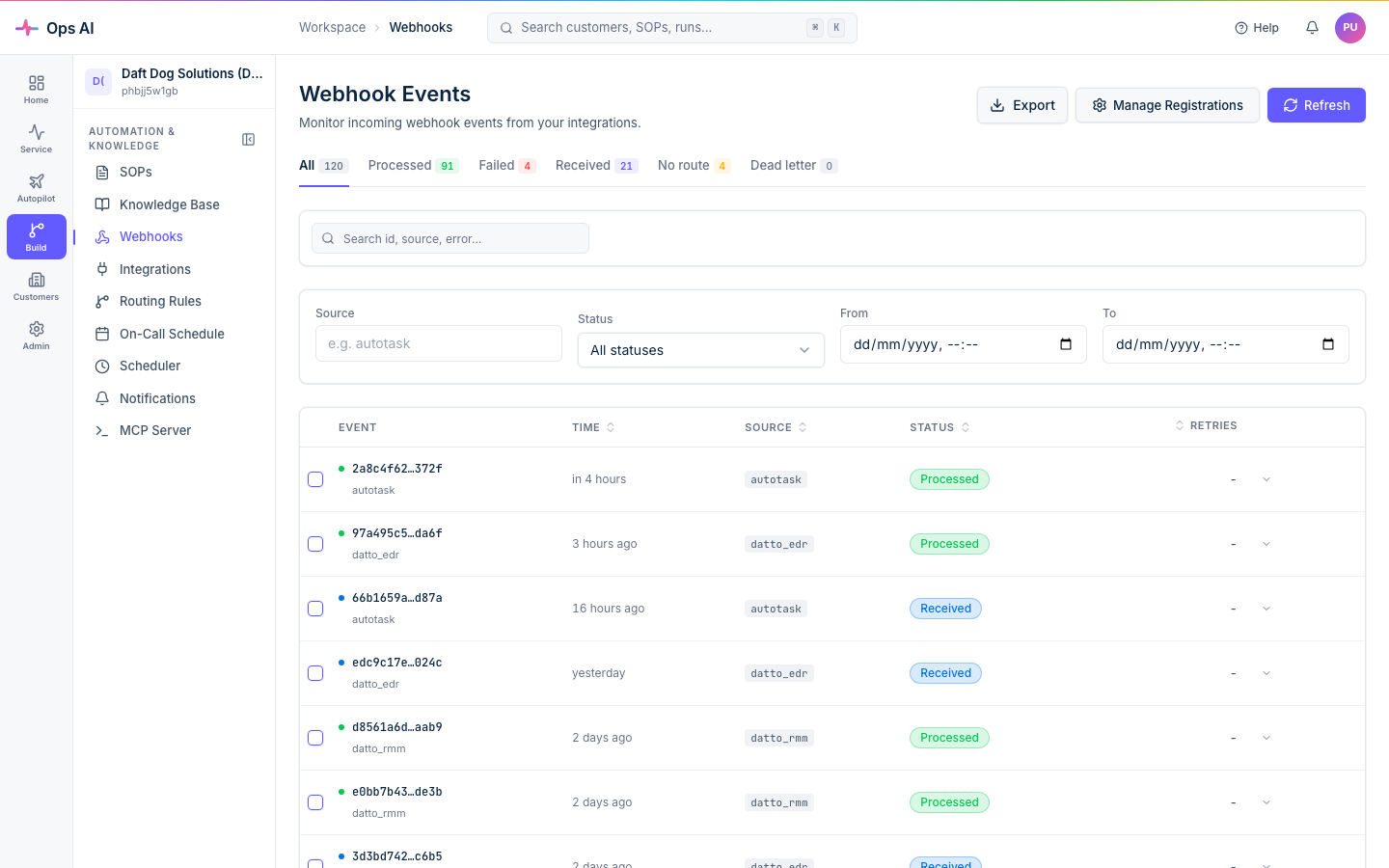
Expand any failed event for a Failure Analysis panel showing:
- Pipeline stage — colour-coded badge indicating exactly where processing stopped (
validation,sop_matching,agent_dispatch,agent_execution,tool_call). - Error type and message — a short classifier (e.g.
no_sop_matched,tool_execution_error) plus the underlying vendor error. - Suggested fix — a remediation hint (e.g. "Create a SOP with keyword 'disk_full' for source 'autotask'").
- Metadata — stage-specific detail (vendor, tool name, agent run id, closest-matched SOP) in a collapsible JSON viewer.
Treat a suggested fix as a diagnostic hint. Establish the cause and inspect earlier effects before any change or replay. A replay can repeat writes; unknown outcomes require read-only reconciliation and an authorised recovery decision.
Replay guards — what you'll see when a replay is rejected
Replay controls constrain admission; they do not make every downstream vendor effect idempotent:
| Error code | HTTP | Meaning | What to do |
|---|---|---|---|
replay_in_flight | 409 | A replay of this source event is already received or processing. | Wait for the in-flight replay to finish; the response includes conflicting_replay_id. |
replay_cooldown | 429 | You replayed the same source event in the last 5 minutes. | Retry after the cooldown — retry_after_seconds reflects the actual remaining cooldown. |
replay_confirmation_required | 422 | The original event already succeeded. Replaying will re-run agents, re-create tickets, re-send notifications. | If you're sure, pass force=true (single replay) or set "force": true in the bulk replay body. |
replay_rate_limit | 429 | You've exceeded the per-MSP replay rate limit (10 replays/minute). | Wait — the response includes retry_after_seconds. |
Reconcile with vendor
Some vendor-management surfaces offer Reconcile. Inspect the specific control: a comparison and an apply/delete action are different operations. Reconciliation may update local state; do not assume every control with this name is read-only. Do not select deletion or repair options without the applicable authority. For Autotask webhook creation with an uncertain local/remote outcome, preserve the returned IDs and reconcile before attempting another create.
Still stuck?
Contact [email protected] with:
- The integration vendor + instance ID (visible on the Integrations page).
- A screenshot of the Integration Status detail or the Failure Analysis panel.
- The timestamp range you're interested in.
Support can look up the correlation ID for any failed call and pivot into vendor logs from there.